Export via command-line
Main Command-line
Fast designer support the following command lines for export (Image. PDF, HTML)
[-SILENT_ERROR]
-EXPORT_TO_IMAGE | -EXPORT_TO_PDF | -EXPORT_TO_HTML
-FRX_FILE=<FRX File>
[-CONFIG_FILE=<Configuration File>]
[-PARAMETER_FILE=<Parameter List File>]
[-PARAMETER(<Parameter Name>)=<Parameter Value>]
[-OUTPUT_FILE=<Output File>]
| Switch / Parameter | Obligation | Description |
|---|---|---|
-EXPORT_TO_IMAGE | Conditional | Initiates an export to image file format(s). |
-EXPORT_TO_PDF | Conditional | Initiates an export to a PDF file. |
-EXPORT_TO_HTML | Conditional | Initiates an export to HTML file(s). |
-FRX_FILE | Required | Specifies the path to the input Fast Report template file (.frx). |
-SILENT_ERROR | Optional | Suppresses all graphical error dialogs. If the execution fails, the command returns a negative exit code. |
-CONFIG_FILE | Optional | Specifies the path to a JSON file containing export configurations. Settings vary based on the export target type. |
-PARAMETER_FILE | Optional | Specifies the path to a JSON configuration file containing report parameters structured as a key-value list. |
-PARAMETER(Name) | Optional | Passes an individual report parameter directly from the command line. This flag can be supplied multiple times. |
-OUTPUT_FILE | Optional | Specifies the destination path for the exported file(s). |
For image exports where no configuration file (-CONFIG_FILE) is provided, Fast Designer determines the output image format automatically from the file extension specified in -OUTPUT_FILE.
Parameter File Structure (-PARAMETER_FILE)
When passing multiple parameters through a configuration JSON file via the -PARAMETER_FILE flag, structure the file as a JSON array of objects containing explicit "Key" and "Value" pairs.
Example Structure:
[
  {
    "Key": "Parameter1",
    "Value": "Fast Designer"
  },
  {
    "Key": "Parameter2",
    "Value": "is awesome"
  }
]
Image Export Configurations
The following JSON block represents the default configuration schema for image generations:
{
    PageRange: "All",
    PageNumbers: "",
    ShiftNonExportable: false,
    ImageFormat: "Jpeg",
    SeparateFiles: true,
    ResolutionX: 96,
    ResolutionY: 96,
    JpegQuality: 100,
    MonochromeTiffCompression: "CompressionCCITT4",
    MonochromeTiff: false
}
Property Descriptions:
-
PageRange: Dictates which pages are exported. Accepted values:-
All: Exports all document pages. -
Current: Exports only the current active page. -
PageNumbers: Processes specific target pages defined inside thePageNumbersproperty.
-
-
PageNumbers: A string containing comma-separated page integers or hyphenated ranges (e.g.,"1,3-5,12"). Leaving this value as an empty string ("") defaults to exporting all pages. -
ShiftNonExportable: A boolean flag. When set totrue, report bands shift position dynamically to adapt to non-exportable band gaps. -
ImageFormat: Specifies the target image structure. Accepted formats include:Bmp,Png,Jpeg,Gif,Tiff, andMetafile. -
SeparateFiles: Determines whether multi-page reports generate standalone, independent image files per page.warningSetting
SeparateFilestofalsefor multi-page documents may force the engine to compile a single massive image canvas, potentially leading to systemOut Of Memoryerrors. -
ResolutionX/ResolutionY: Integer variables indicating the horizontal and vertical graphic density outputs measured in dots per inch (DPI). -
JpegQuality: An integer ranging up to 100 which specifies the compression quality for JPEG file creation. -
MonochromeTiff: A boolean flag indicating whether a TIFF export must force a monochrome color matrix. -
MonochromeTiffCompression:Sets the compression encoder when producing TIFF formats. Supported options include:-
ColorTypeCMYK
-
ColorTypeYCCK
-
CompressionLZW
-
CompressionCCITT3
-
CompressionCCITT4
-
CompressionRle
-
CompressionNone
-
ScanMethodInterlaced
-
ScanMethodNonInterlaced
-
VersionGif87
-
VersionGif89
-
RenderProgressive
-
RenderNonProgressive
-
TransformRotate90
-
TransformRotate180
-
TransformRotate270
-
TransformFlipHorizontal
-
TransformFlipVertical
-
MultiFrame
-
LastFrame
-
Flush
-
FrameDimensionTime
-
FrameDimensionResolution
-
FrameDimensionPage
-
-
MonochromeTiff: determines whether the Tiff export must produce monochrome image.
PDF Export Configurations
The PDF export module operates via a simple image embbeding.
The following JSON block represents the default configuration schema for PDF generations:
{
    PageRange: "All",
    PageNumbers: "",
    ShiftNonExportable: false
}
Property Descriptions:
-
PageRange: Dictates which pages are exported. Accepted values:-
All: Exports all document pages. -
Current: Exports only the current active page. -
PageNumbers: Processes specific target pages defined inside thePageNumbersproperty.
-
-
PageNumbers: A string containing comma-separated page integers or hyphenated ranges (e.g.,"1,3-5,12"). Leaving this value as an empty string ("") defaults to exporting all pages. -
ShiftNonExportable: A boolean flag. When set totrue, report bands shift position dynamically to adapt to non-exportable band gaps.
HTML Export Configurations
The following JSON block represents the default configuration schema for web-ready HTML conversions:
{
    PageRange: "All",
    PageNumbers: "",
    ShiftNonExportable: false,
    Zoom: 1.0,
    ReportID: "",
    OnClickTemplate: "",
    Layers: true,
    StylePrefix: "",
    WebImagePrefix: "",
    WebImageSuffix: "",
    Print: false,
    HighQualitySVG: false,
    Preview: false,
    PageBreaks: false,
    Format: "HTML",
    WidthUnits: "Pixel",
    HeightUnits: "Pixel",
    ImageFormat: "Png",
    Pictures: true,
    EmbedPictures: false,
    ExportMode: "Export",
    SinglePage: false,
    Navigator: true,
    SubFolder: true,
    Wysiwyg: true,
    EnableMargins: false,
    NotRotateLandscapePage: false
}
Property Descriptions:
-
PageRange: Dictates which pages are exported. Accepted values:-
All: Exports all document pages. -
Current: Exports only the current active page. -
PageNumbers: Processes specific target pages defined inside thePageNumbersproperty.
-
-
PageNumbers: A string containing comma-separated page integers or hyphenated ranges (e.g.,"1,3-5,12"). Leaving this value as an empty string ("") defaults to exporting all pages. -
ShiftNonExportable: A boolean flag. When set totrue, report bands shift position dynamically to adapt to non-exportable band gaps. -
Zoom: A float multiplier managing the scaling factor of the output web page. -
ReportID: Sets a unique alphanumeric identifier attribute for the compiled report. -
OnClickTemplate: Configures a localized JavaScript template definition for click events. -
Layers: Boolean value to enable or disable an HTML element layer-based layout approach. -
Print: If set totrue, automatically prompts the client browser's native Print Dialog window upon opening the document. -
HighQualitySVG: Toggles optimized graphic rendering enhancements for embedded SVG visuals. -
Preview: Controls web rendering preview behaviors. -
PageBreaks: Toggles standard CSS page break visibility margins between sheet separations when single-page display layouts are active. -
Format: Determines web format output encoding:-
HTML: Standard clean HTML page structure. -
MessageHTML: Encapsulated MHTML/Message-based format.
-
-
WidthUnits/HeightUnits: Sets dimensional scaling values. Options includePixelorPercent. -
ImageFormat: Formats images embedded alongside the HTML script. Supported types:Bmp,Png,Jpeg, orGif. -
Pictures: Toggles overall visibility of picture components in the generated output. -
EmbedPictures: When set totrue, embeds binary image assets directly inside the HTML markup using Base64 URI strings instead of keeping them as separate asset links. -
ExportMode: Sets specific runtime interaction profiles. Supported options:Export(Simple file creation),WebPreview(Interactive browser preview tracking), orWebPrint(Print optimization layout). -
SinglePage: Forces the compiler to output a singular unified scrolling HTML page instead of multiple segmented files. -
Navigator: Toggles the multi-page navigator toolbar interface on the generated webpage. -
SubFolder: Toggles whether auxiliary files and image resources are isolated inside an independent workspace sub-folder. -
Wysiwyg: Enforces precise "What You See Is What You Get" visual accuracy layout compliance. -
EnableMargins: Enables element page margin constraints. Note: Only functions whenLayersmode is active. -
NotRotateLandscapePage: Prevents automated rotation rules on sheets explicitly flagged with landscape orientations during browser printing events. -
StylePrefix/WebImagePrefix/WebImageSuffix: Reserved strictly for core application internal use.
Examples
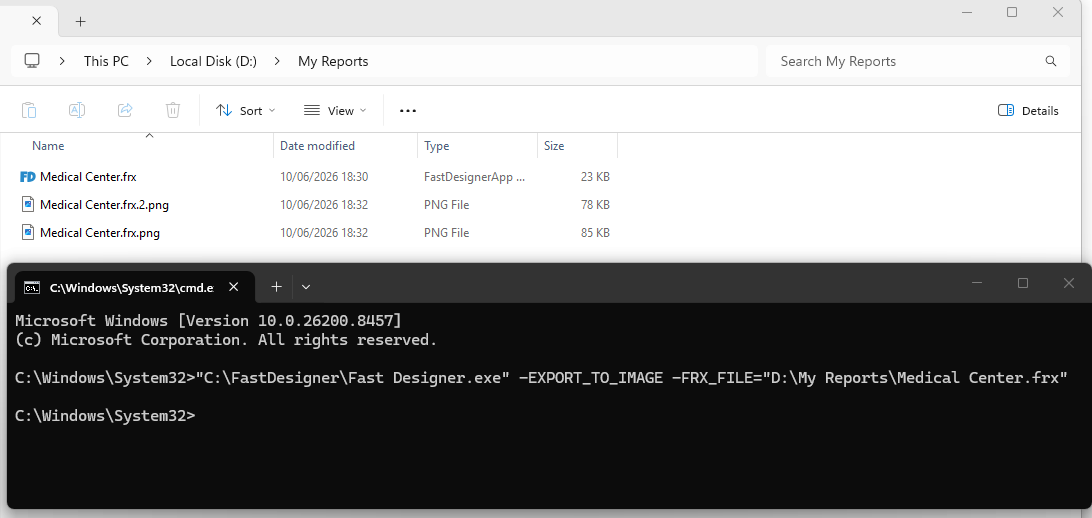
Basic Image Export
Executes a quick image export using fallback defaults from an input template, assuming Fast Designer is located at C:\FastDesigner and templates are saved in D:\My Reports\:
"C:\FastDesigner\Fast Designer.exe" -EXPORT_TO_IMAGE -FRX_FILE="D:\My Reports\Medical Center.frx"
Targeting Custom Destination Paths
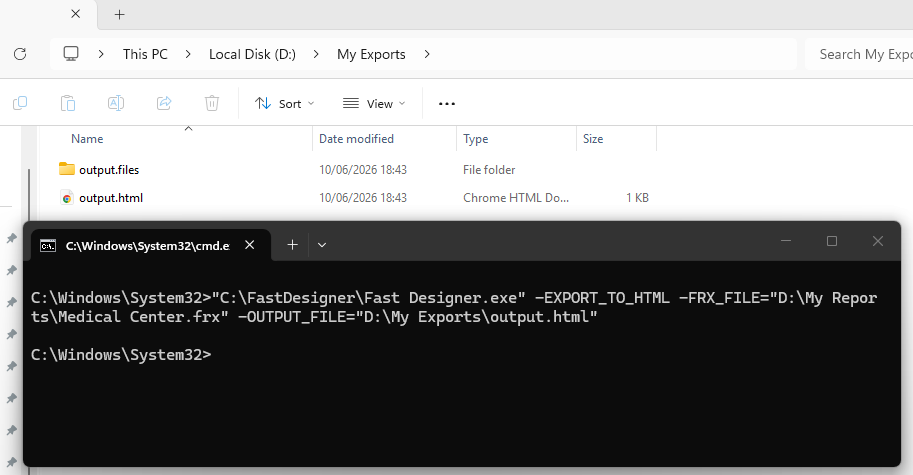
To route the export processes directly to a defined folder path, include the -OUTPUT_FILE flag:
"C:\FastDesigner\Fast Designer.exe" -EXPORT_TO_HTML -FRX_FILE="D:\My Reports\Medical Center.frx" -OUTPUT_FILE="D:\My Exports\output.html"
Advanced Scripted Automation (Silent with Arguments)
The following script utilizes the -SILENT_ERROR flag to cleanly suppress GUI popups during automated headless cycles, loads a standalone export profile configuration, passes discrete report parameters directly, and writes a target image file out:
"C:\FastDesigner\Fast Designer.exe" -SILENT_ERROR -EXPORT_TO_IMAGE -FRX_FILE="D:\My Reports\Medical Center.frx" -CONFIG_FILE="D:\image_config.json" -PARAMETER("Param1")="Hello" -PARAMETER("Param2")=" World" -OUTPUT_FILE="D:\My Exports\output.png"